- In ERG mode your smart trainer changes its resistance to hold a power target, whatever your cadence. Hammy holds every interval this way.
- If you stop pedalling or stall, Hammy releases ERG so you are never stuck against a target. Pedal again and the target ramps back in by itself.
- It works with Bluetooth trainers that support target power through FTMS. Other trainers pair read-only. Hammy is on the App Store for iPhone and iPad.
What ERG mode does
In ERG mode the trainer is in charge of the resistance. A workout step asks for 225 W, and the trainer adjusts its resistance to keep your power there. Pedal faster and it eases off. Pedal slower and it adds some. You do not shift gears, and you do not chase a number on a screen. You keep turning the pedals.
That is why ERG suits structured indoor training. Every interval starts at its target from the first seconds, a steady block stays steady, and a short hard effort cannot drift easy because you got tired. Each minute on the trainer does the job it was planned for. The ERG mode vs resistance mode guide explains the difference in more detail, including when resistance mode is the better choice.
The problem every ERG app has to solve
ERG has one catch. If you slow right down or stop, a trainer that keeps adding resistance can leave you stuck against a target you can no longer turn. Riders call it the spiral of death. It is the moment that separates a good ERG app from a frustrating one, because the trainer cannot fix it on its own. The app has to let go.
What Hammy does when you stop pedalling
Hammy watches your cadence and power during every ride and steps in when you stop or stall.
- You stop. Cadence below 20 rpm for 3 seconds releases ERG.
- You stall on a hard interval. When the target is above 85% of your FTP, cadence under 55 rpm for about 5 seconds releases ERG too.
- No cadence reading. Hammy then judges from power. Under about 15 W for 3 seconds counts as stopped, and under half the target for 8 seconds counts as a stall.
When ERG is released, the trainer eases to a light load of about 40 W, so the pedals turn freely again. The ride clock keeps running, and the screen says ERG released with a plain instruction: pedal above 60 W and ERG returns on its own. On iPhone a short haptic marks the release and another marks the return.
To bring the target back, just pedal. After about 5 seconds of steady pedalling, the target ramps in over about 3 seconds. There is no button to find while you are out of breath. If you release ERG twice within 30 seconds, Hammy waits for about 10 seconds of steady pedalling before it ramps back in, so a rough patch does not turn into a fight with the trainer.
Pause works the same way in spirit. It freezes the clock and eases the trainer. When you resume and ERG was on, the target comes straight back.
Trainers differ in how quickly they ease off, so start with an easy workout and feel it once before a hard session.
See it on the ride screen
The ride screen is built for a quick glance from the saddle. The green ERG on pill tells you the trainer is holding the target. Your power is the big number, with the target and the time left in the step beside it. Below you see the next interval, your heart rate, the workout profile and the controls: intensity, pause, extend a step by a minute, and skip.
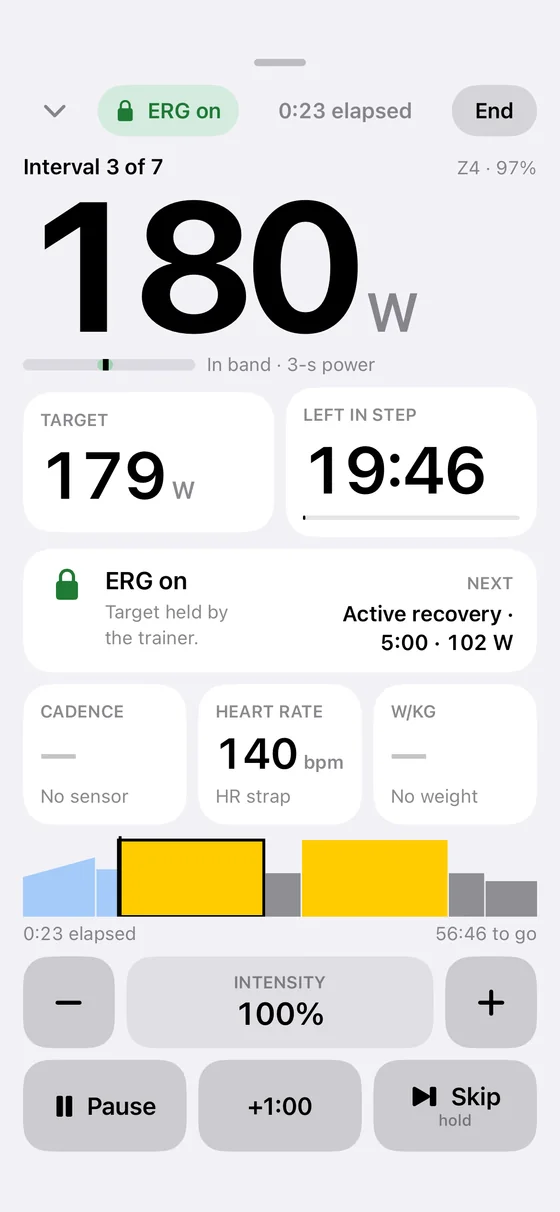
The same screen on iPad uses the extra room for bigger numbers you can read from further away.
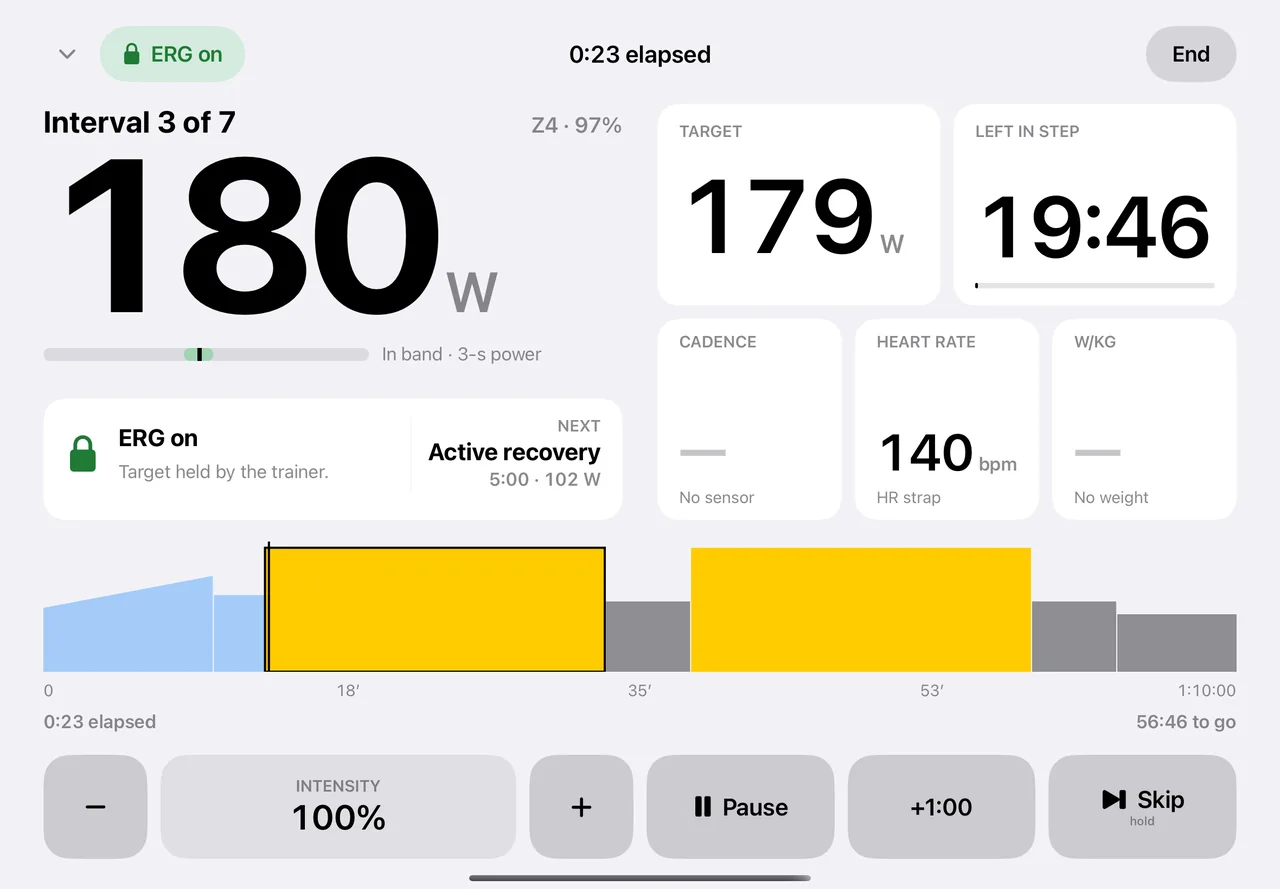
If a target feels too hard on the day, the Intensity control scales the targets down or up for the rest of the ride, in 1% steps between 50% and 150%. Most targets are a share of your FTP, so the workouts follow your fitness.
Which trainers work
Hammy talks to your trainer over Bluetooth. The standard that matters is FTMS, the Bluetooth Fitness Machine Service.1 A trainer that supports target power through FTMS can be controlled by Hammy, which is what ERG needs. Most smart trainers sold in recent years support it, and the specification sheet or the maker’s site tells you.
Hammy does not keep a list of supported models. When you pair a trainer, it asks the trainer what it can do, including its range of power, and goes by the answer. Hammy keeps its requests inside that range.
| Trainer | What you see | ERG |
|---|---|---|
| Bluetooth, target power through FTMS | Target-power control supported | Yes |
| Bluetooth, reports power only | Read-only · Not controlling resistance | No, you shift to the target |
| ANT+ only | Does not appear in the search | No |
Hammy reads your power from the trainer, so you do not need a separate power meter. A trainer that only speaks ANT+ will not show up, because iPhones and iPads do not have an ANT+ radio. Many trainers accept one connection at a time, so close other cycling apps before you pair. The smart trainer setup guide walks through pairing step by step and explains what to do when a trainer drops out.
ERG and your FTP test
Hammy has two FTP tests, the Ramp Test and the 20-minute test. The 20-minute test mixes both modes. On a trainer that can leave ERG, Hammy holds ERG for the warm-up, lets go of the resistance for the 20-minute effort so you can pace it yourself, and holds ERG again for the cool-down. A trainer that cannot leave ERG should use the Ramp Test, which uses fixed watts.
What Hammy is and is not
Hammy is for riders who want a workout, a target and a trainer that holds it. It runs on iPhone and iPad, rides in ERG mode, has a touch editor for your own sessions and records every ride with the power against the target. There is no virtual world and no racing, only the session you planned. It is also not an adaptive coach: you choose the workouts and plans, and the targets scale with your FTP.
Questions
What is an ERG mode app?
An ERG mode app sends target watts to your smart trainer and lets the trainer change its resistance to hold them. It plays the workout, sets each target and records the ride. Hammy is one for iPhone and iPad.
Does ERG mode work on iPhone and iPad?
Yes, over Bluetooth. Pair a trainer that supports target power through FTMS and Hammy controls its resistance. iPhones and iPads cannot talk to ANT+ only trainers.
What happens if I stop pedalling in an interval?
Hammy releases ERG after about 3 seconds without pedalling, so you are not stuck against the target. Pedal again and the target ramps back in by itself after a few seconds. If you stop twice within 30 seconds, it waits for about 10 seconds of steady pedalling first.
Do I need a power meter?
No. A smart trainer measures your power, and Hammy reads it from the trainer.
What if my trainer does not support FTMS target power?
It can still pair. Hammy shows the target and your power, labels the ride Read-only, and you shift gears to match the target.
Do I need Zwift or another app to use it?
No. Hammy works on its own. Calibration and spin-down are not part of Hammy, so do them in your trainer maker’s own app.
Is Hammy available yet?
Yes. Hammy is on the App Store for iPhone and iPad. Download Hammy on the App Store.
Sources
What this page says about other apps and standards comes from their own public pages, listed here. We read them on 25 October 2026. Things change, so check their pages for the latest.
- Bluetooth SIG · Fitness Machine Service 1.0. The Bluetooth standard (FTMS) through which an app can ask a trainer what it supports and set its target power. Checked 25 October 2026.
Product names belong to their owners. Hammy is not affiliated with or endorsed by them. We do not list other apps’ prices; see their own pages. Found a mistake? Email [email protected] and we will fix it.